
Beta
Install the beta
Five minutes, once. Apelles is free and open source; the only unusual step is telling macOS you trust an app Apple has not reviewed yet.
What you need
- A Mac with Apple Silicon (M1 or later). Intel Macs are not supported.
- macOS 13 Ventura or later.
- About 3 GB of free space: the app itself is 250 MB, and its AI features set up about 2 GB more on first launch.
1. Download
Open the latest release on GitHub and,
under Assets, download the file ending in
_aarch64.dmg.
2. Move it to Applications
Open the downloaded .dmg and drag Apelles onto the
Applications folder beside it. Then eject the disk image.
3. Open it, and allow it once
Open Apelles from Applications. The first time, macOS stops it with this:
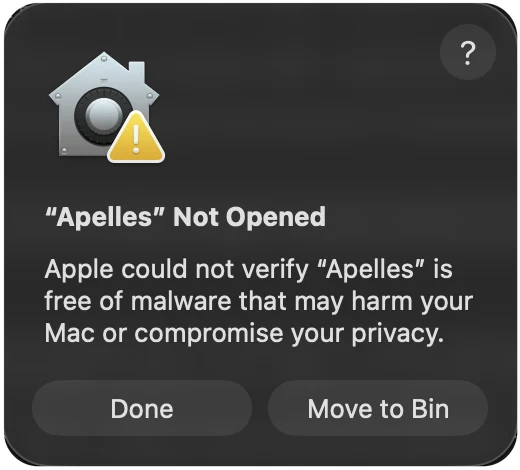
- Click Done. Do not move it to the Bin.
- Open System Settings → Privacy & Security, and scroll down to Security.
- Next to “Apelles” was blocked to protect your Mac, click Open Anyway, and confirm with your password or Touch ID.
- Click Open Anyway once more in the dialog that follows.
From then on Apelles opens like any other app. macOS asks once per download, so a newer beta you download later goes through these four steps one more time.
Why macOS asks
Apple only skips this step for apps signed with a paid Apple developer certificate and scanned by Apple (“notarized”). The beta is signed, but not with that certificate yet, so macOS cannot vouch for it and leaves the decision to you. Nothing is wrong with the file; the full source it is built from is public on GitHub, and you can build it yourself instead.
Or, from Terminal
If you are comfortable in Terminal, this clears the “downloaded from the internet” flag so the dialog never appears. Run it after step 2:
xattr -dr com.apple.quarantine /Applications/Apelles.app4. First launch
Editing works straight away. In the background, Apelles sets up its AI environment (transcription, subject masks, depth) — about 2 GB, downloaded once. AI features become available as soon as it finishes, and each model downloads the first time you use its feature. Everything runs on your Mac; nothing you edit is uploaded.
What is in this beta
- Edit — the multi-track editor, transcript cuts and retakes, export.
- Colorist — grading, AI masks, relight, scopes.
- Motion is not in the first beta. Its export needs Node.js and a headless Chrome; it returns once the app can download those for you on first use.
- Agents. Any MCP client (Claude Code, Claude Desktop, Cursor…) can drive the app: the plug icon in the title bar opens Connect an agent.
Something broke?
Please open an issue on GitHub with what
you did and what happened. The app's log is at
~/Library/Logs/studio.apelles.app/app.log; attaching it helps a
lot.
Uninstall
Drag Apelles from Applications to the Bin. To also remove its AI environment, models and
settings, delete
~/Library/Application Support/studio.apelles.app.