
Inside Apelles
Three rooms, one window.
Cutting, motion graphics and colour normally mean three applications and three round trips through an export. Here they are three parts of the same project, and everything below is built and working today — nothing on this page is a plan. Motion is the one room not in the first beta yet.
01 — Where the video gets its shape.
Edit
A real multi-track editor. Everything a working editor expects to find under their hands is here — and everything here can be asked for in a sentence instead.
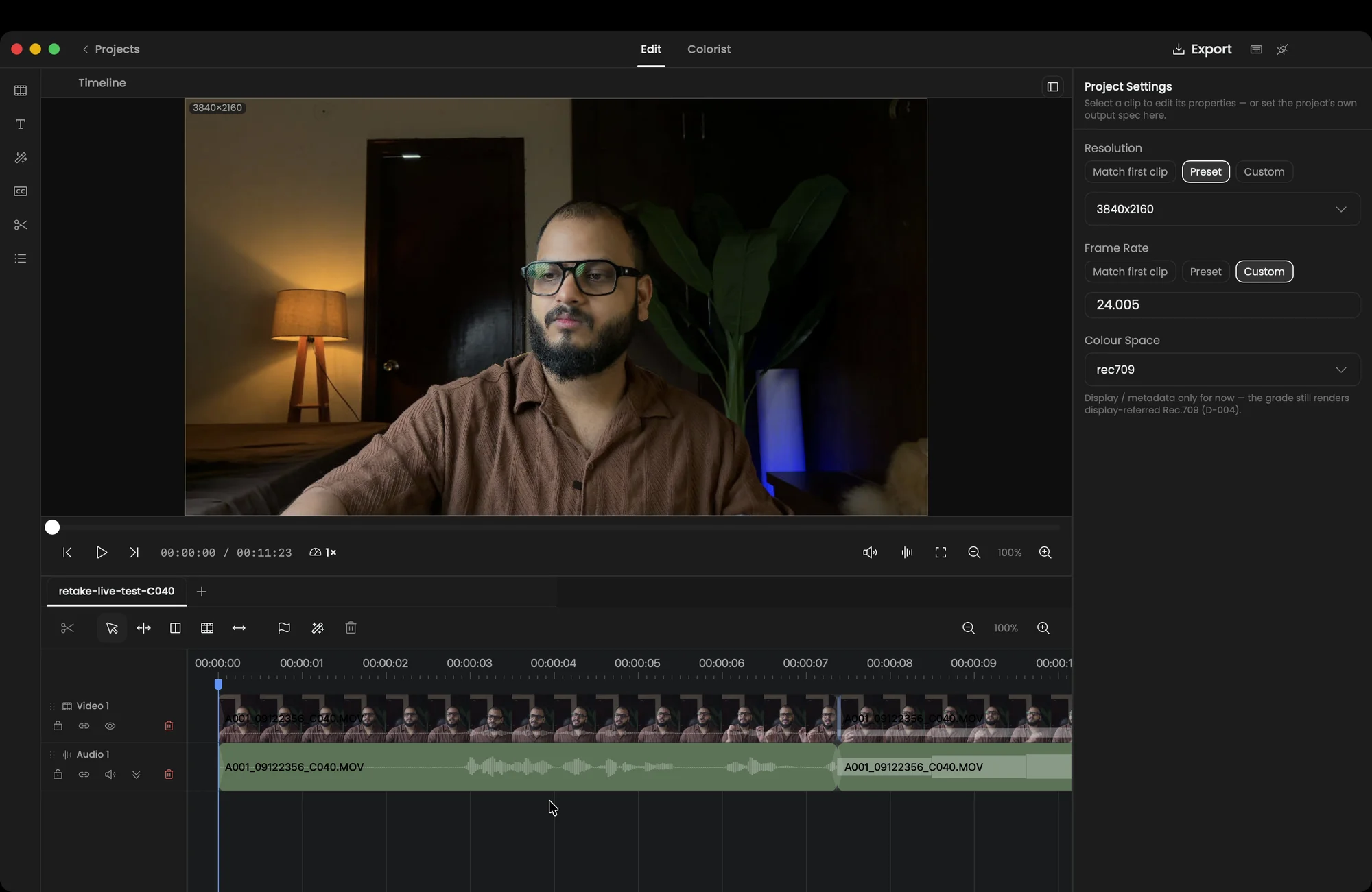
- Video, audio and subtitle tracks composited alpha-over, not opaque top-wins
- Ripple, roll, slip, slide, swap-media and the seven edit types on drop
- Multi-select, marquee, cross-track ripple and real A/V linking
- Per-clip transform with independent width/height, crop, and per-property keyframes
- Real cubic-bezier keyframe easing, dynamic zoom, and speed ramps that can run in reverse
- Transitions that bridge a cut and read handle media — clips never overlap
- Text and title clips, subtitles, and animated caption presets burned into preview and export alike
- Per-clip volume, constant-power pan, four-band parametric EQ, track gain and ducking
- Frame-anchored timeline markers on Resolve’s own sixteen-colour palette
- Export the whole timeline to video with real mixed audio, or to DTD-verified FCPXML 1.7
02 — Where it stops looking like a phone recording.
Colorist
Real colour work, with real colour science underneath — the single biggest difference between footage that looks amateur and footage that does not, and the part nobody teaches you.
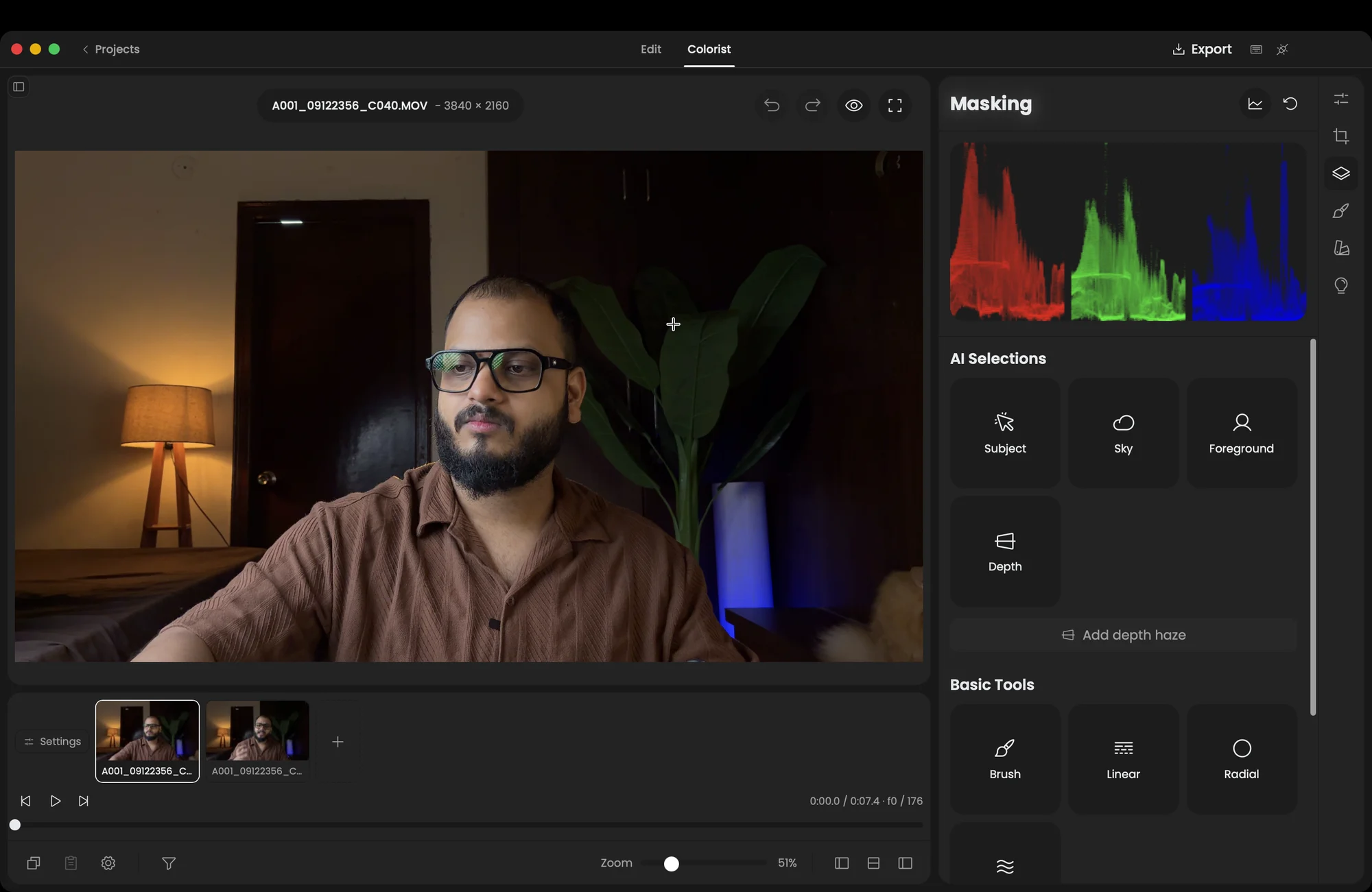
- A wgpu/WGSL GPU render pipeline with a layered, non-destructive adjustment stack
- Primary, master and per-channel tone curves, lift/gamma/gain wheels, LUT nodes, HSL qualifier
- Shape masks (radial, linear, brush) with feather, per-mask adjustments and per-mask blur
- SAM 2 subject masks with video propagation, refined through a trimap into ViTMatte
- Depth masks via Depth Anything V2, plus a temporally-consistent depth track for moving cameras
- Mask keyframes: geometry authored at source frames, interpolated at render time
- A live scopes panel — luma, RGB, parade, vectorscope, histogram
- Interactive relight: draggable depth-driven light pucks, deterministic and real-time
- Closed-loop match_to_reference, depth-haze, ProRes/H.264 export and a .cube bake
03 — Where things move on their own.
Motion Coming next
Titles, callouts and graphics that animate — built in the same window as the cut, not exported out of a second app and imported back.
Motion is built and working in the development build, but not in the first beta: its export needs Node.js and a headless Chrome, and it returns once the app can download those for you. No screenshot of it is shown until then.
- Ten layer primitives — text, emphasis, matrix, graph, layers, particleflow, labelbox, layerstack, plus claudechat and deviceframe
- A multi-scene JSON manifest and compiler, with each scene optionally 3D
- A live Remotion player preview with its own transport
- On-canvas select, drag, resize, marquee and group-move in world coordinates
- A per-row keyframe timeline with a real bezier ease-curve editor
- A browsable primitive catalog that actually creates layers, and a typed property Inspector
- Render exports every scene as its own video file, auto-imported back into Sources
Where the project actually is.
- Stage
- Pre-release
- Platform
- macOS (Apple Silicon)
- Licence
- AGPL-3.0
- Windows
- Surveyed and scoped, not yet built
No downloads, no user numbers and no testimonials on this page, because there are none of those things yet. There is a list.
Request beta access